The direct answer
A café POS brief should freeze the workstation logic before the counter is fabricated. Settle the equipment list, staff and customer positions, screen and terminal reach, printer paper path, power, network, cable routes, ventilation, cleaning, secure storage, accessibility and replacement access. The counter should support ordering and payment without forcing staff to twist, blocking the collection route or leaving cables across wet and busy surfaces. Treat every device as a maintained piece of equipment with dimensions, interfaces and service actions, not as a generic rectangle on the plan.
Map the order-to-payment sequence
Observe the intended sequence: greeting, order entry, modifier questions, payment, receipt, cup or ticket marking and handoff to production. Mark where the customer, cashier and queue stand at each step. A single screen may serve low volume, while a second order point or mobile terminal may be needed at peaks. Keep the payment terminal visible and reachable without staff passing it over hot equipment or across the drink-making path. The technology layout should reinforce the operating flow already tested in the counter plan.
Freeze devices or define controlled envelopes
List POS screen or tablet, stand, payment terminal, receipt printer, cash drawer if any, customer display, barcode scanner, kitchen printer and network equipment. Record exact dimensions, opening or tilt range, power supply, interfaces, operating environment and cable connector positions. Epson’s current TM-m30III data, for example, publishes its 127 by 127 by 130 millimetre body, 24-volt supply and multiple interfaces; another printer can differ materially. If procurement is open, define conservative envelopes and require a final data-sheet review before manufacture.
Design power, data and cable routes as one system
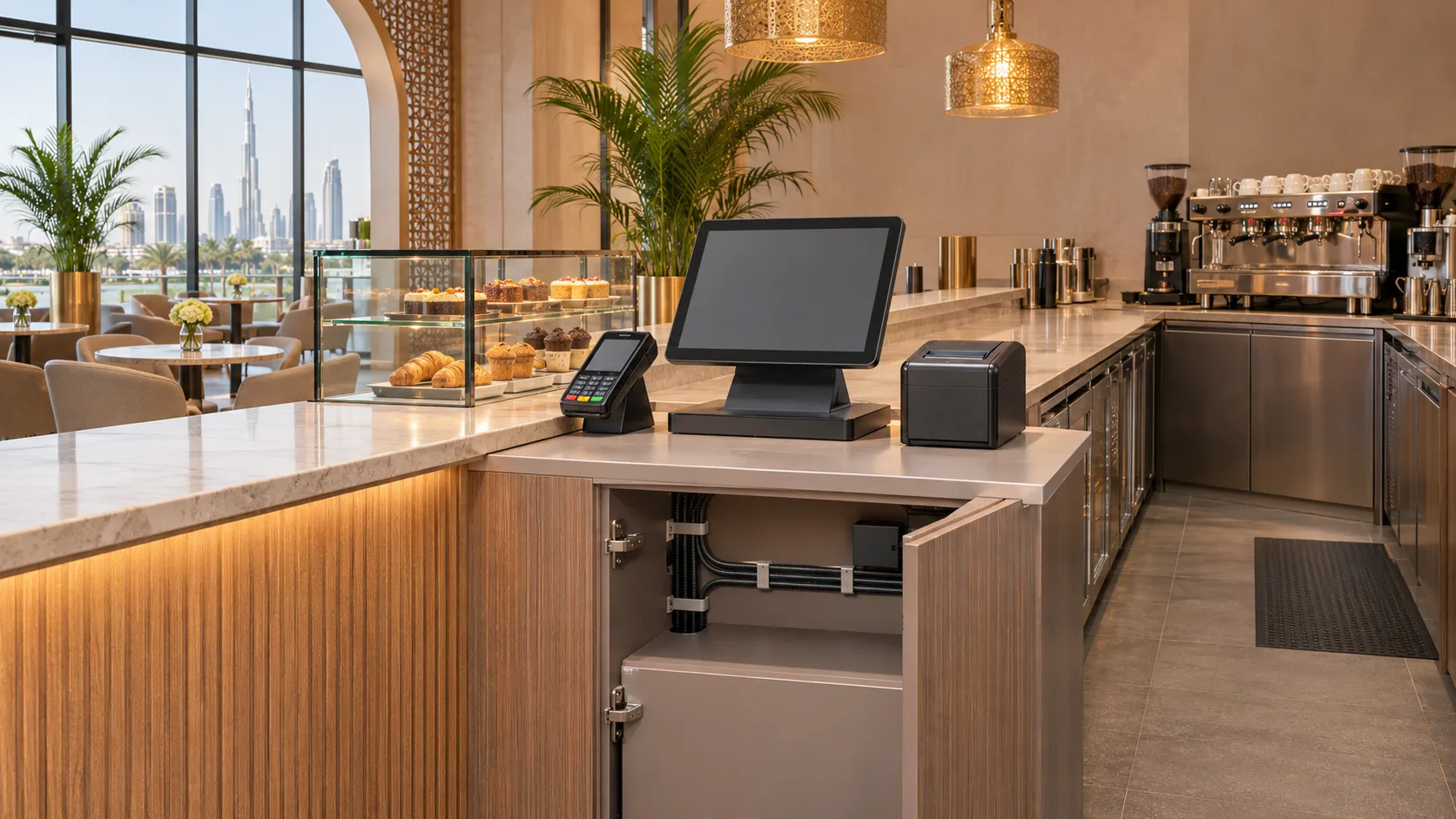
Show every outlet, power supply, network point, cable entry and spare route on the counter section. Keep low-voltage and mains services appropriately segregated and allow connectors to be unplugged without dismantling the joinery. DEWA publishes electrical regulations and current circulars for Dubai projects; qualified electrical designers and installers must apply the relevant requirements. Do not rely on extension blocks buried in cabinets. Provide strain relief, protected edges and a controlled path from the device to the service zone, with room for the actual plug and power brick.
Allow paper, heat and fault access
A receipt printer needs room for its cover to open and for the paper roll to be changed. Staff should be able to clear a jam and see status indicators without crawling under the counter. Power supplies and network devices also produce heat and need manufacturer-compliant ventilation. Avoid a sealed drawer unless the selected equipment is approved for that arrangement. Agree how the counter opens for maintenance, which panel is removable and whether the device can be swapped during trading without disturbing plumbing, refrigeration or stocked shelves.
Coordinate hygiene, spills and cleaning
Place technology away from sink splash, espresso purging, ice handling and wet cloth storage. The counter surface around the POS should be easy to wipe without driving liquid into cable holes or device bases. Raise or gasket penetrations as the selected system requires and keep paper stock dry. This is not a licence to invent a waterproof enclosure: follow equipment ratings and specialist advice. The cleaning brief should state which devices move, how cables are protected and where staff can place a terminal temporarily while the work surface is cleaned.
Planning example
Planning example: a compact café places a tablet, payment terminal and printer beside the espresso machine. The first elevation hides the printer in a drawer and shows one cable hole. A device review finds that the printer lid cannot open, the terminal cable crosses the tamping zone and the power bricks have no ventilation. The revised design creates a dry POS bay at the queue end, a printer shelf with full paper-change clearance, separate protected cable routes and a removable service panel. The cashier can operate the terminal while the barista route remains clear.
Buyer checklist before manufacture
The approval pack should include equipment data and a coordinated counter section.
- Order and payment sequence tested
- Device models or conservative envelopes agreed
- Screen, terminal and customer display reach checked
- Printer cover and paper roll clearance shown
- Power, data, interfaces and spare routes coordinated
- Cables segregated, protected and replaceable
- Heat, cleaning and spill exposure reviewed
- Removable panel and fault-response access identified
Limitations and next step
This guide does not design an electrical, network or payment-security system. Requirements depend on the selected technology, payment provider, landlord, building and authority review. The next step is a short workstation workshop with operations, the POS supplier, counter designer, electrical and network specialists. Issue one equipment schedule and one coordinated counter section, then verify the physical devices or accurate templates before fabrication release. At handover, test transactions, receipt changes, restart access and cable identification under realistic trading conditions.
Sources & further reading
Make this useful for your project.
A review of your property and priorities can turn general guidance into a defined brief.
Explore Cafe fit outDiscuss your project